🏫 Request Access

Request your
school.

BroncoSort currently supports Cal Poly Pomona. If your school is not supported yet, request access directly from the extension while you are on your school’s registration page.

You must have already searched for a class before submitting a request.

Step 1

Open BroncoSort from Chrome

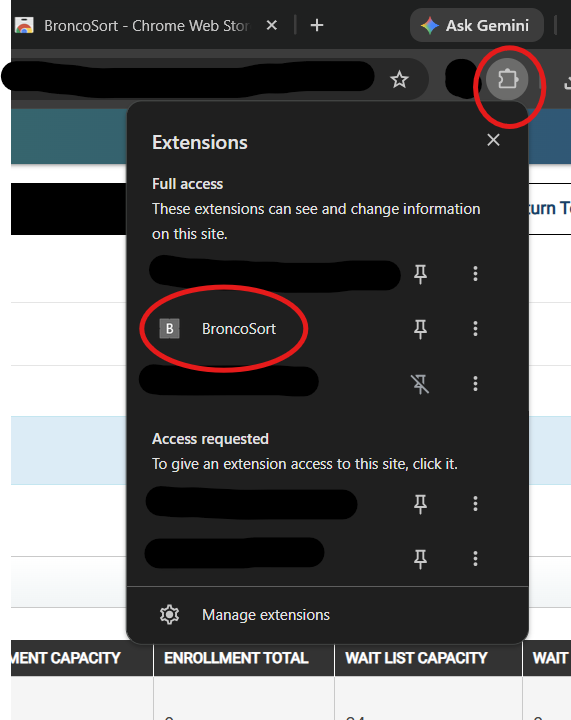
Click the extensions icon, then open BroncoSort while you are on your school registration page.

Open BroncoSort from Chrome
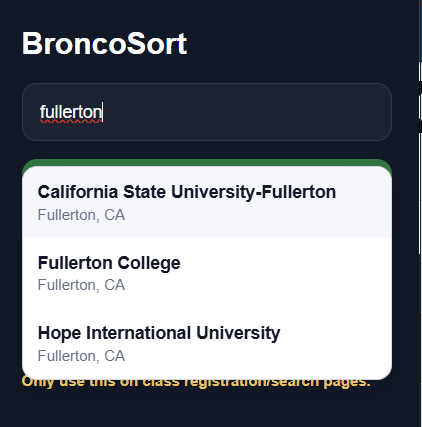
Search for your school in BroncoSort
Step 2

Search for your school

Type your school name and select the correct campus from the dropdown.

Step 3

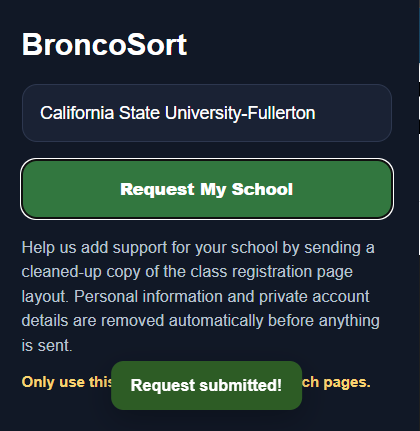
Submit the request

Click “Request My School.” BroncoSort sends the cleaned page structure so support can be reviewed.

Request submitted in BroncoSort

Why requests must come from the registration page

Every school registration system is structured differently. Submitting requests directly from the registration page helps BroncoSort understand the page layout, identify professor listings correctly, and build support for that campus faster.